
Backs up before every change · Will not run while Serato is open
Let’s get your crates gig ready.
CrateOrganizer is a Serato crate organizer that reads your music folders, builds every Serato crate to match, finds the duplicates you have been collecting for years, and clears out the tracks Serato can no longer find. It shows you the plan before it writes anything.
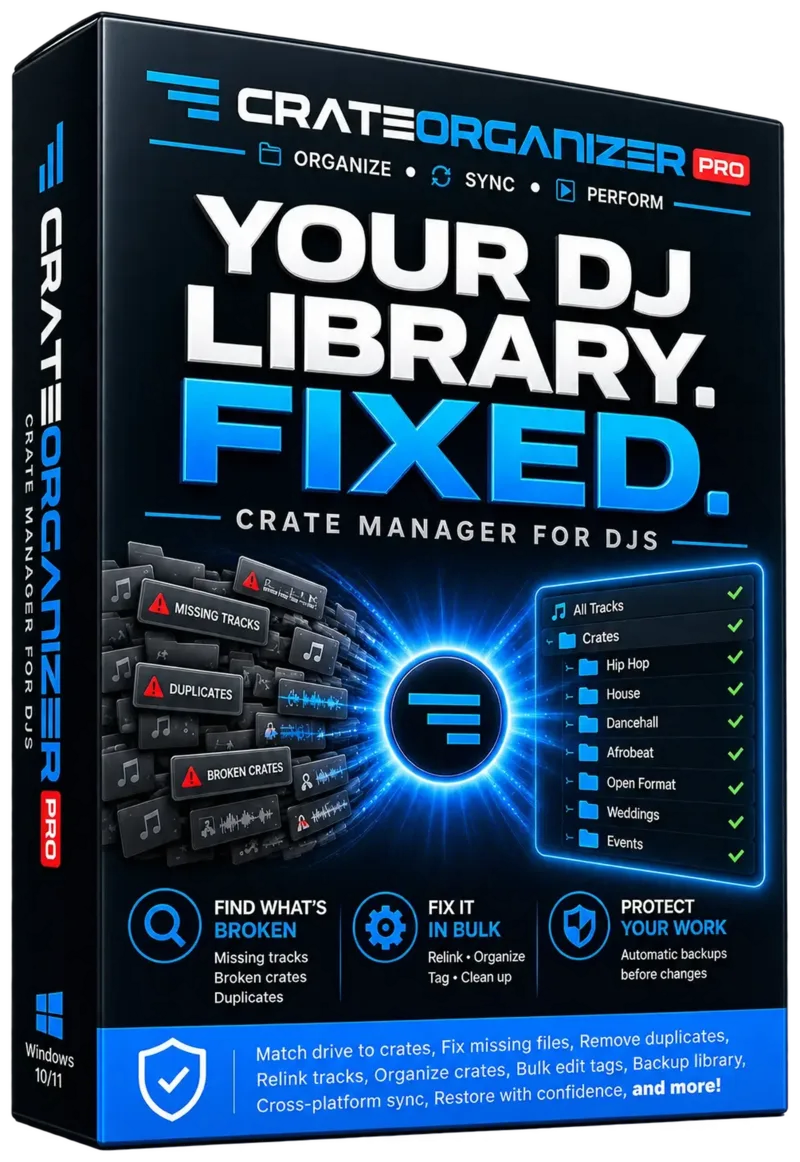
- Automatically build Serato crates from foldersPoint it at your music folder and every folder becomes a crate, sub-folders and all. Add records later and it picks up only what is new.
- Find duplicate songs in your Serato libraryCatches the same track saved three or four times under different names and bitrates, shows what the copies cost you in drive space, and never groups a remix with the original.
- Fix the red, orange and yellow missing-file triangles in SeratoLists every track Serato can no longer find, tells the difference between a deleted file and an unplugged drive, and clears the dead entries in one pass.
- Edit ID3 tags and rename music files without breaking SeratoFix artist, title, genre and BPM in a spreadsheet-style table. Rename the file itself and your crates and Serato’s own library follow it, so nothing turns into a warning triangle.
- Sync an external DJ drive and keep crates matching foldersWorks on the gig drive, builds a Serato library from scratch on a new one, and watches your folders so new music appears in Serato on its own.
- Move your library to Rekordbox, Traktor or a USB stickSend every crate across with the BPMs, keys and hot cues you already tagged, or pack the crates and the music onto a stick that plays at the venue with no setting up.
it was built against
from folders
the scan turned up
you ticking them
The problem
Serato will never build a crate for you.
So you drag them in by hand, forget half of them, end up with the same tune five times, and find a wall of red and orange missing-file triangles the night before a gig.
The same track, four times
Different bitrates, different names, different folders. It eats your drive and makes you second-guess which version is the good one mid-set.
Finds them, plays them side by side, deletes the ones you choose.
Red triangles everywhere
You moved a folder or cleaned out a drive, and now Serato is full of tracks it cannot find. There is no way in Serato to clear them out in bulk.
Lists them, you tick the ones to remove, gone.
Music that never made it in
New folders do not appear on their own. Every drop, every promo pack, every purchase has to be dragged in by hand, and the ones you forget are the ones you needed.
One click. Every new folder becomes a crate.
Scared to touch it
One bad tool, one wrong click, and years of crates are gone. So the mess stays, because the mess is at least familiar.
Shows the plan first. Backs up every time. Refuses when unsure.
What it does
One window, and it never surprises you.
No dashboard to learn, and nothing running in the background after you close it. Here is the actual app, screen by screen.
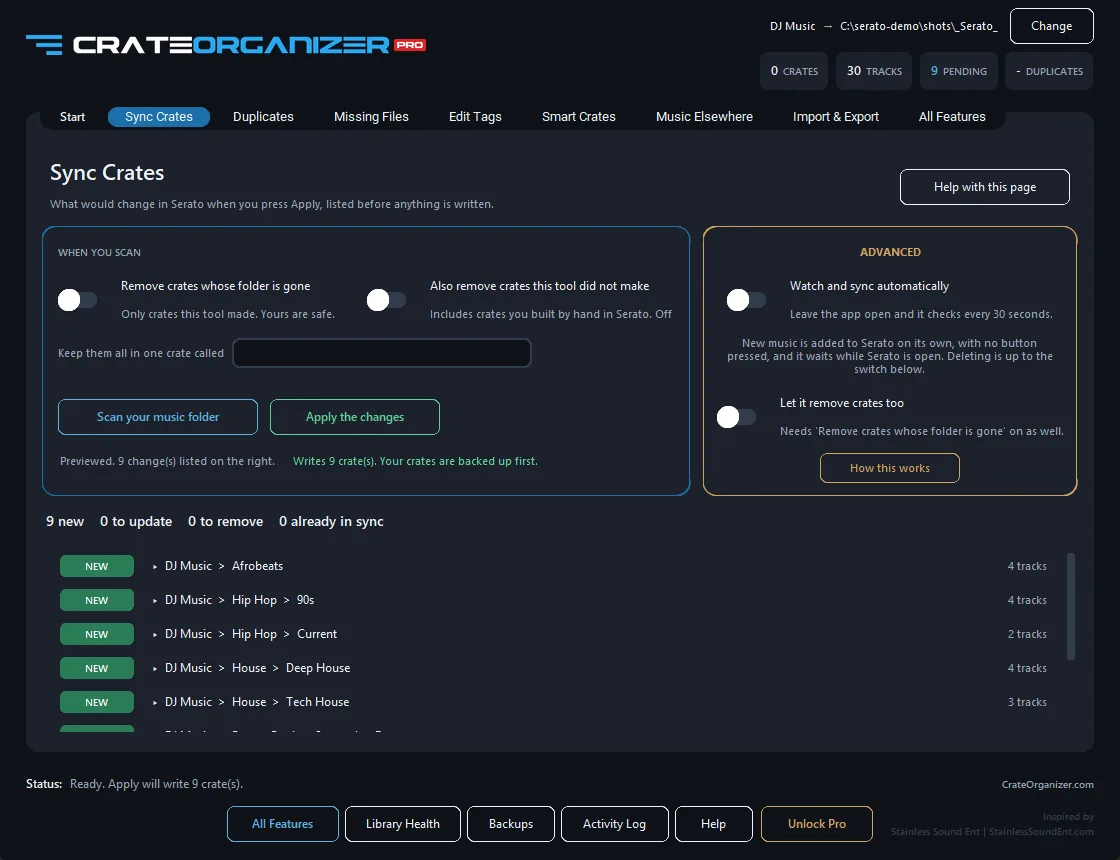
Folder sync Free
Organise in Explorer. Your Serato crate organizer follows.
Using Serato’s Auto Import folder for this? Serato retired it in 4.0, and here is what to do instead.
Every folder holding music becomes a crate. Folders inside become sub-crates, as deep as your folders go. Add music, scan again, and only what changed is written.
- Nested folders become nested crates, at any depth
- A plan of every change before a single file is written
- Watch your folders and re-sync automatically
- Builds a Serato library from scratch on a new drive
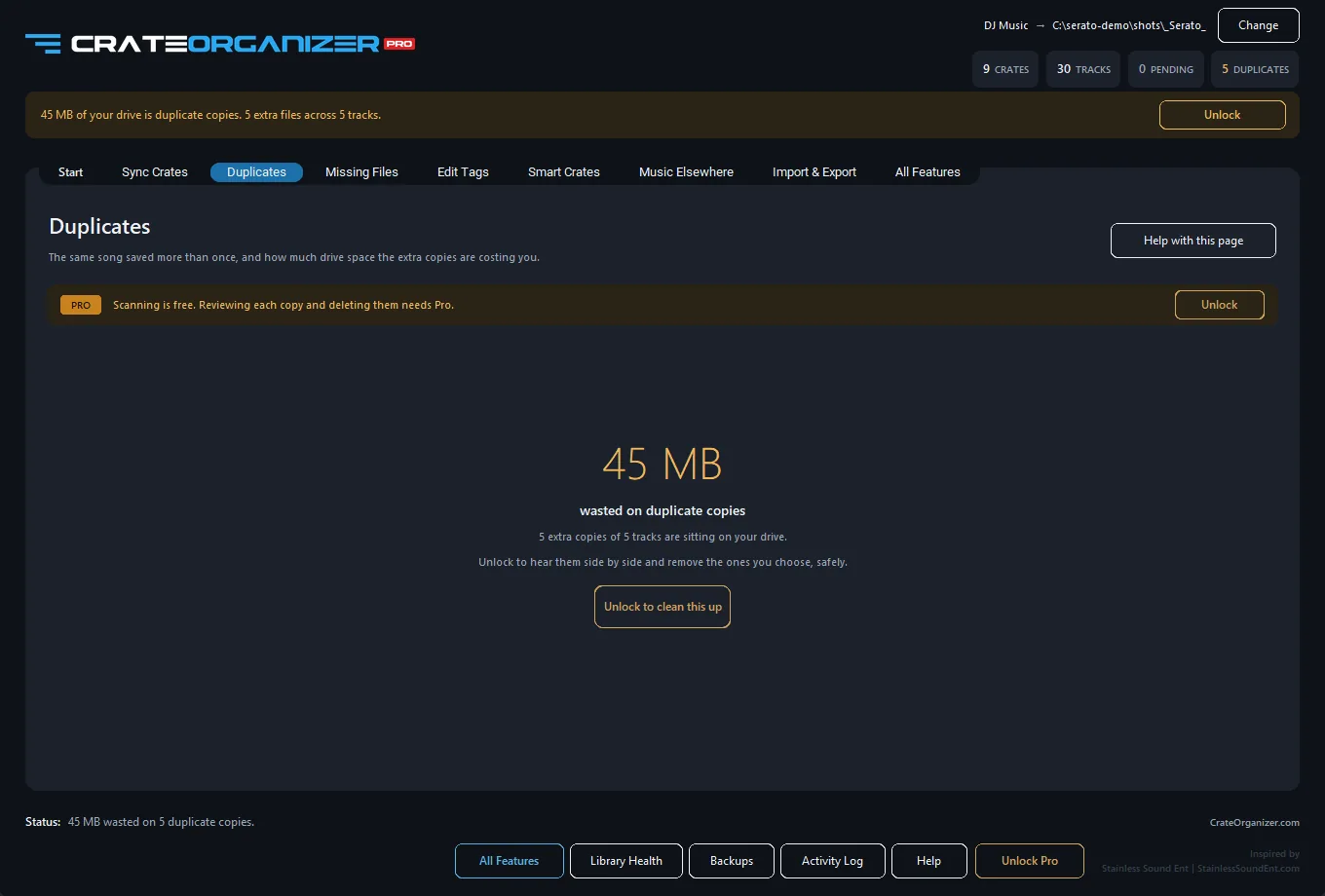
Duplicate finder Pro
Reclaim the drive without binning the wrong file.
Groups copies by how certain it is: byte-for-byte identical, same artist and title, or matching filenames where tags are missing. Length, bitrate and size sit beside every copy, and the one worth keeping is marked.
Your cue points are safe. The copy carrying your cues, loops and grids is the one kept by default, and every crate that pointed at a deleted copy is repointed at the keeper. No crate is left with a missing file because you tidied up.
- Play any copy before you decide, without leaving the window
- Remixes, edits, live cuts and acapellas are never grouped with the original
- Deletions go to the Recycle Bin, so nothing is ever really gone
- On one real library it found 12,719 extra copies
Missing tracks Pro
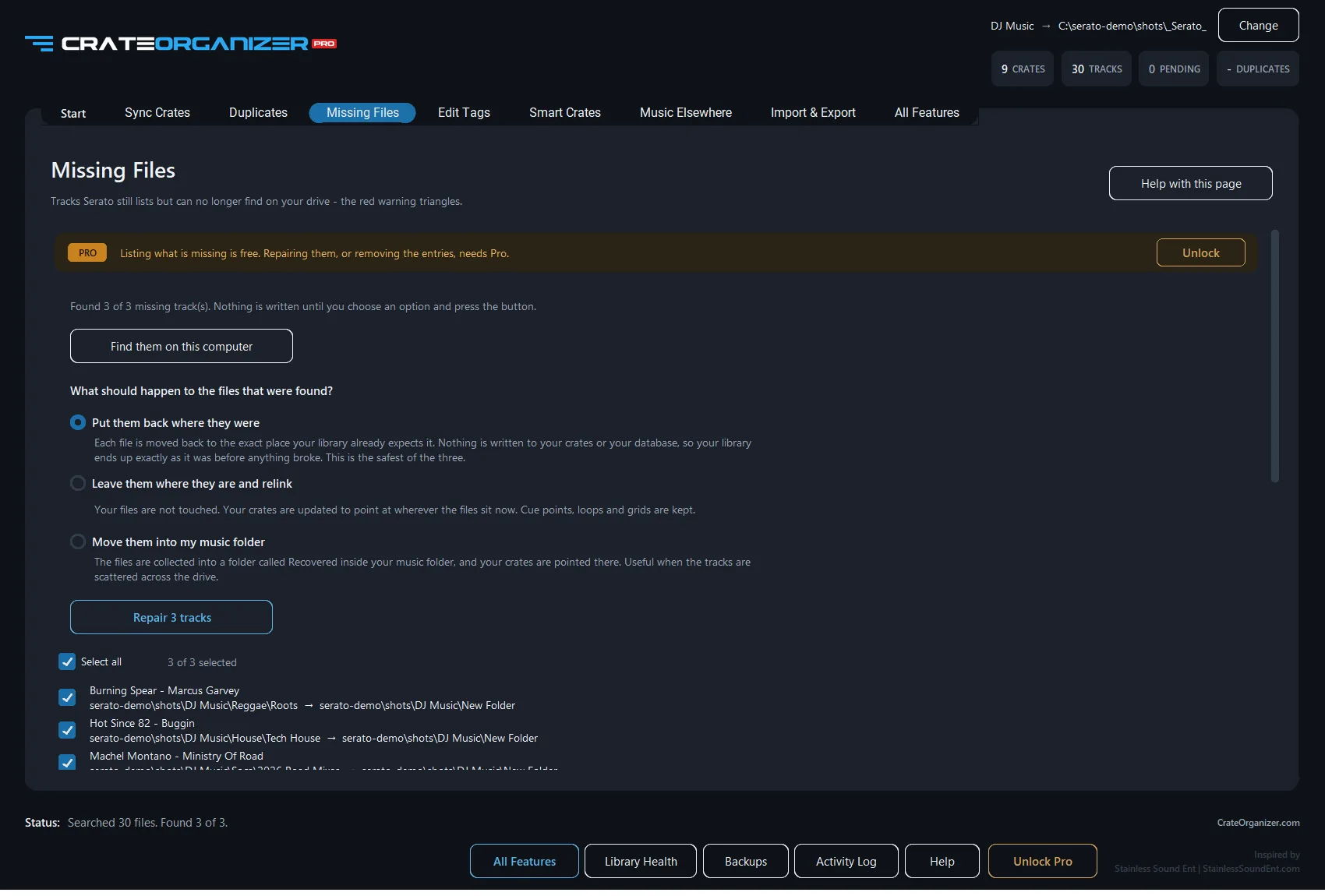
Clear the red and orange triangles in one pass.
Red, orange, yellow, brown: Serato colours them differently but the cause is almost always the same, a file that moved or was renamed. CrateOrganizer Pro finds them wherever they went.
Lists every entry Serato can no longer resolve so you can tick off the ones to remove. Nothing is ticked to begin with, and a drive that is simply unplugged is counted and left alone.
- Every missing track listed with its artist and album
- Unplugged drives are reported as offline, never as missing
- On the machine this was built against, 203 of 206 were unplugged drives
- Serato’s own database is backed up before anything is removed
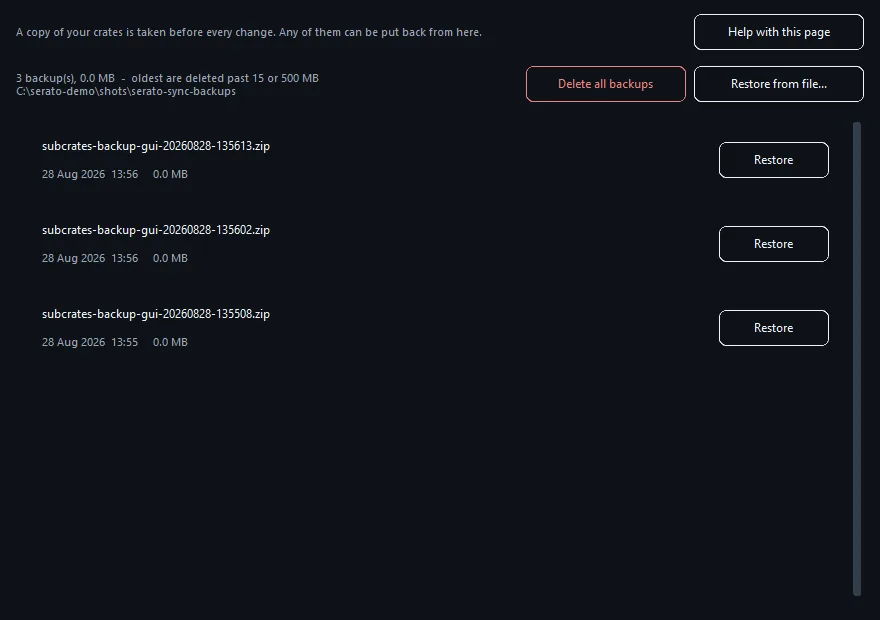
Backups Free
Every write is undoable.
Your crates are zipped before anything is written, timestamped so a later backup can never overwrite an earlier one. Restore any of them in one click.
- Automatic, on every single write
- Restore any archive without leaving the app
- Pruned past 15 archives or 500 MB, and the newest is never dropped
- Atomic writes: a crash cannot leave a half-written crate
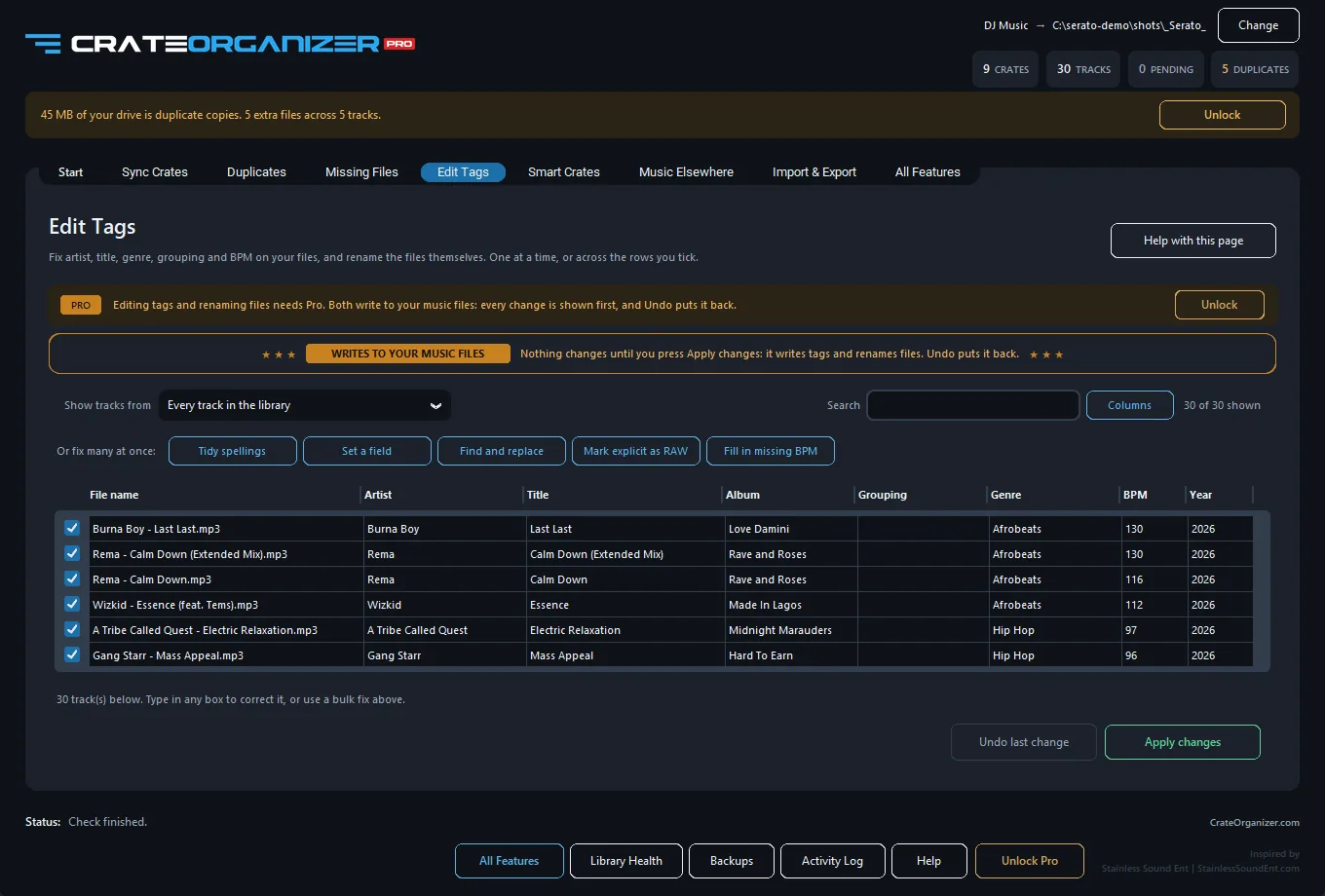
Edit tags Pro
Fix your tags in a table, not one track at a time.
Artist, title, album, grouping, genre, BPM and year in one editable grid, with the file name in the first column. Type into a box, watch it turn bright orange, and nothing is written until you press Apply.
- Rename the file itself and your crates and Serato’s database follow it
- Collapse four spellings of one artist into the best one
- Mark the explicit versions from what the files already say
- Stop half way and it all comes back exactly as you left it
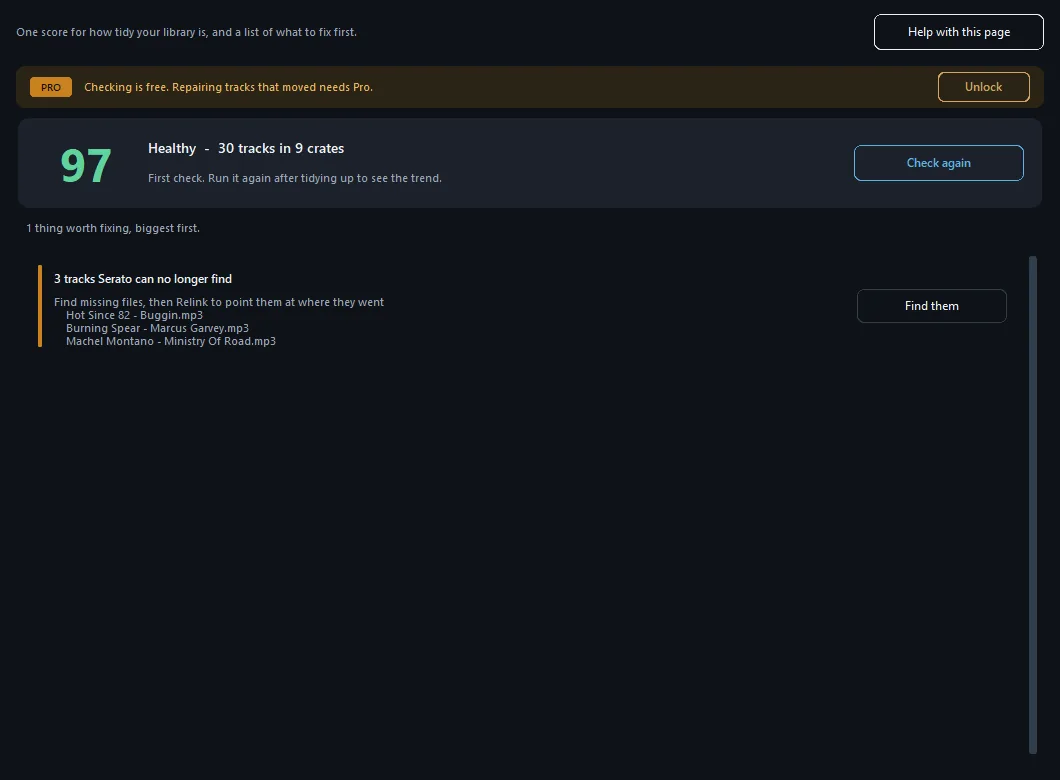
Library health Free to check
One score, and what to fix first.
Missing tracks, files that will not play, duplicates, music sitting in no crate, tracks with no BPM. Scored out of a hundred and listed heaviest first, so a night of tidying goes where it counts.
- Every check is kept, so weeks of clean-up read as a trend
- Files that moved rather than vanished can be found and relinked
- Runs on a library of a hundred thousand tracks in about a minute
- Checking is free. Repairing is Pro
And a good deal more besides.
Library health, smart crates, USB packing, moving to Rekordbox or Traktor. Every one of them is written up in the full manual.
One file, no installer
How it works
Four steps, about ninety seconds.
Nothing is written to your library until you have seen exactly what would change and pressed Apply.
Close Serato
It saves over anything changed while it is open. The app checks, and refuses to write if it is running.
Pick your music folder
The top folder, not a single genre. Your Serato library is found automatically, on the same drive.
Scan, then look
You get a plan of what is new, changed or removed, crate by crate. Nothing is written yet.
Apply
Crates are backed up first, then written. Open Serato and run Analyze Files for BPM and key.
Newer Serato keeps its library somewhere else. Recent versions of Serato DJ Pro hold the real library in their own database and rewrite the older database V2 file from it on every launch, so tools that only edit the folder appear to do nothing. CrateOrganizer detects which of the three generations you are on, says so plainly, and works with all of them.
Ninety seconds from here.
Close Serato, pick your music folder, read the plan, press Apply.
One file · No installer
Pricing
The sync is free forever.
Turning your folders into crates costs nothing and always will. The cleanup tools are one payment, and nothing renews.
Sync is free
Free
$0 forever
Yours to keep, with no time limit.
- Folder-to-crate sync, any depth
- A plan of every change before it is written
- Backups on every write, one-click restore
- Create a Serato library on a new drive
- Watch folders and re-sync automatically
Pro
$69.95$49.9529% OFF once
No subscription. One computer.
- Everything in Free
- Duplicate finder, with playback and a suggested keeper
- Remove the tracks Serato can no longer find
- Playlist import and export: M3U8, M3U, PLS, CSV
- Folder links, for music across several folders
Full breakdown on the pricing page.
Guides
Serato crate problems, written up properly.
Every one of these started as a thread from a DJ with a broken library. Free to read, no sign-up.
Serato DJ Lite vs Pro: What Is Free and What You Pay For
The real difference between Serato DJ Lite and Pro in Serato's own terms, the actual prices, and the three restrictions that decide it for most DJs.
How to Swap Your Serato Drive Without Breaking Crates
Learn how to move your Serato library to a new external drive without breaking crates or losing hot cues. Safe methods for relinking tracks.
How to Keep Two DJ Laptops in Sync With the Same Serato Crates
Keep your Serato crates synchronized across two laptops. Learn cloud sync, external drive, and Crate Sync methods to avoid conflicts.
Clean Up a Messy Serato Library: Dead Tracks and Gaps
Fix missing tracks, remove duplicates, and clean up your Serato library for better performance and organization. Practical steps for large libraries.
Serato on an External Drive: Set It Up So Files Never Go Missing
Set up Serato on an external hard drive safely. Learn drive selection, formatting, file organization, backup strategies, and preventing disconnections.
How to Merge Two Serato Libraries From Different Drives
Safely merge two Serato libraries from different drives or computers. Consolidate, deduplicate, and combine crates without losing metadata.
Questions
Nothing changes until you say so.
Will this change my music files?
Syncing never does. It reads your folders and writes Serato crate files, and your audio is left where it is.
Three things do change your files, and each one only when you ask for it by name: editing tags on the Edit Tags page, renaming a file on that same page, and deleting a duplicate you have ticked. Tag edits and renames are listed before they are written and undo in one click; deleted duplicates go to the Recycle Bin, never straight off the drive.
The full list of what is written and what is not is in the manual.
Will it break the crates I made by hand?
Crates you built yourself in Serato are never touched by a sync. Crate removal is opt-in and confined to the folder tree the app manages. Every write is backed up first, and you can restore any backup in one click.
Can it fill in BPM and key?
No, and nothing outside Serato can. BPM, key and beatgrids come from Serato’s own analysis. Run Analyze Files in Serato after syncing.
Why must my music and library be on the same drive?
Serato stores track locations relative to the drive, with no drive letter, so a crate on D: can only point at files on D:. The app blocks a mismatched pair rather than writing crates that would appear empty.
Does it work with an external DJ drive?
Yes, that is the normal case. Keep the _Serato_ folder on the same drive as the music. If the drive has no library yet, the app offers to create one.
Is it affiliated with Serato?
No. CrateOrganizer is an independent tool and is not affiliated with, endorsed by, or supported by Serato Audio Research.
More in how it works, or get in touch.
Get your crates matching your folders.
Free, one file, and it will not touch anything without showing you first.
Subscribe
Get updates on new features
New features in CrateOrganizer, and every new DJ tool we release.