
Serato DJ 4.0
Serato Auto Import stopped working. Here is why, and what to do instead.
Your new music still lands in the Auto Import folder. Serato still moves it. But the Latest Import crate stays empty, and the tracks you just bought are somewhere in All, unfindable. This is not a bug that is coming back.
Auto Import failures in Serato 4.0 typically stem from incorrect folder linking or permission issues in the _Serato_ folder. Check that your music library path is still valid and that the _Serato/ImportPath.json file points to the correct directories.
What changed
Serato has marked the Auto Import folder [LEGACY] in its own documentation. Their support page now states the folder “is only there for Whitelabel files to be imported automatically”, and warns that making your own folders inside it “is going to cause issues”.
Read that again, because it matters more than a broken feature would. Serato is not saying Auto Import is broken and will be fixed. Serato is saying the way most people used it was never a supported workflow in the first place.
So there is no fix coming. If your library routine depended on dropping music into Auto Import and finding it in Latest Import, you need a different routine, not a patch.
What it looks like when it happens
- New music goes into the Auto Import folder as always
- Serato still moves the files out of it on launch, so it looks like it worked
- The Latest Import crate is empty, or shows an older batch
- Search All and the tracks are there, just not grouped as new
- Nothing errors, so it is easy to lose a week of downloads before you notice
The last one is what actually costs people. There is no warning, so you find out at the gig when the tune you bought on Tuesday is not in the crate you expected.
The workaround people are using, and why it is a bad idea
The community answer doing the rounds is to install the last version before 4.0, run that one first to trigger the import, then close it and open 4.0.
It works. It also means running two copies of your DJ software against one library, launching them in a fixed order every time you buy music, and staying on an unsupported build that will not get fixes, new hardware support or the next Serato feature. On a gig laptop, that is a lot of risk to save a drag and drop.
If you do try it, back up your crates first. Two Serato versions writing to one database is exactly the situation where crates go missing.
Doing it manually, properly
If you would rather not install anything, this is the reliable version of the manual method:
- Put new music in a normal folder, not the Auto Import folder
- In Serato, open the Files panel and find that folder
- Drag the folder onto the crate you want, not onto All
- Sort by Date Added to confirm what actually landed
Dragging onto the crate rather than All is the part people miss, and it is why so many end up with the same tracks twice. It is still manual work every single time you buy music.
The permanent replacement: a watched folder
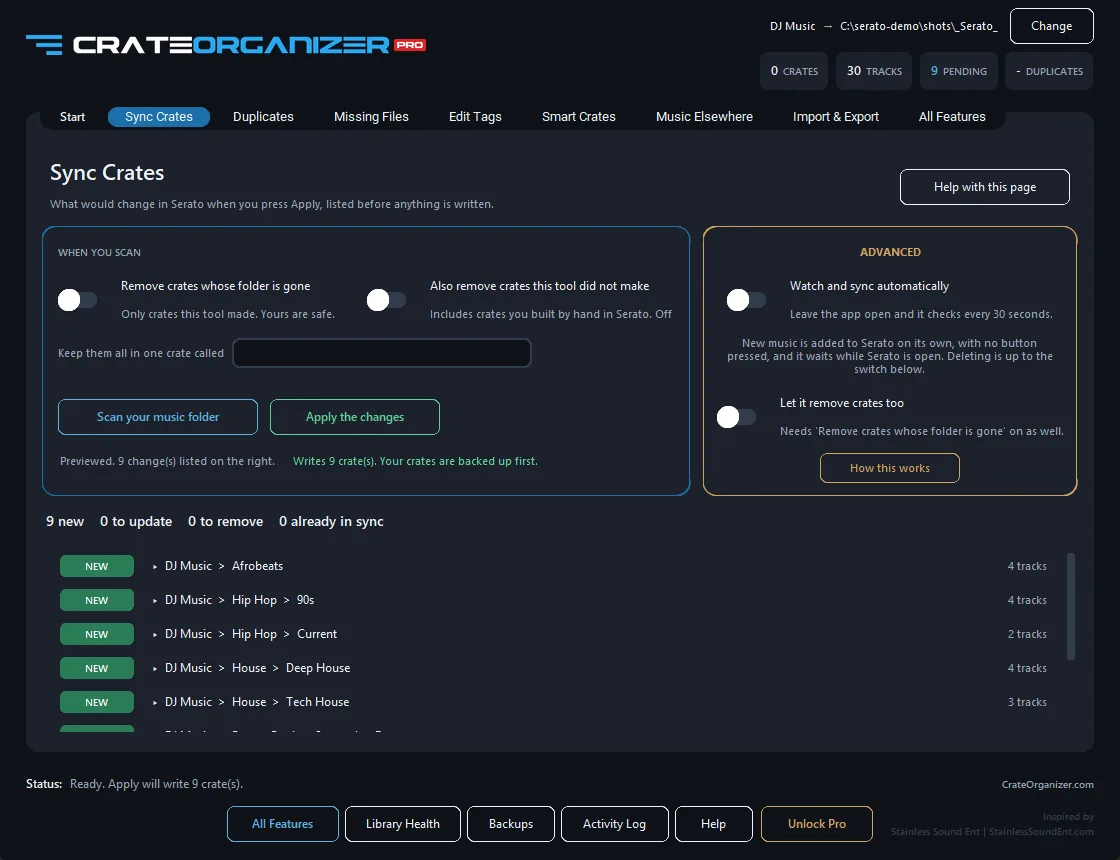
CrateOrganizer Pro watches a folder and keeps a crate matching it. Not once on launch, and not dependent on anything Serato chooses to deprecate. Drop a track into a folder and the crate has it.
- Every folder becomes a crate, sub-folders become sub-crates
- New music is picked up on its own, and only what is new is added
- It runs against your Serato library files directly, so it does not care what Serato retires next
- Your crates are zipped and timestamped before any write, restorable in one click
- It refuses to run while Serato is open, because Serato overwrites anything changed under it
Folder-to-crate syncing and watched folders are free, forever. The cleanup tools are the paid part.
Questions
Is Auto Import definitely not coming back?
Serato has not announced a removal date, but marking a feature LEGACY in the documentation and describing the common use of it as unsupported is not the language of a feature that is being repaired. Plan as though it is going.
Will a watched folder create duplicates?
No. It compares against what is already in the crate and adds only what is new. If you already have duplicates from the manual dragging, the duplicate finder clears them.
Does this touch my music files?
Syncing does not. It writes crate files, nothing else. The tag editor and the rename tool do write to your files, and both say so before they run, and both back up first.
What about my cue points?
Untouched. Cues, loops and grids live in your files and in Serato’s database, and folder syncing does not write to either.
Does it work on Serato DJ Lite?
Yes. Pro and Lite both.
Get your new music where it belongs.
Free for Windows 10 and 11. One zip, no installer, and nothing is written to your library until you have seen the plan.
Frequently Asked Questions
Why did my Auto Import crate stop getting new tracks?
Serato 4.0 deprecated Auto Import for user workflows. The Import folder is only for Whitelabel files now. You need to manually drag tracks into crates or use Serato’s folder monitoring instead.
Where should I put new music if Auto Import no longer works?
Add music to your main library folder on disk, then let Serato’s folder monitor pick it up. Alternatively, drag and drop tracks directly into crates from your file manager.
What is the ImportPath.json file for?
ImportPath.json in the _Serato_ folder stores the path to your Auto Import directory. If your music location moved, this file becomes invalid and must be updated via Serato’s settings or by manually editing the file path.
Can I get Auto Import working like it did in Serato 3?
No. Serato explicitly removed this workflow in 4.0. The feature won’t return; you must adapt your library routine to use drag-and-drop or folder monitoring instead.
If 4.0 changed something you depend on and you would rather go back than work around it, Serato keeps an official archive of previous builds. Where to find it, and how to install over the top without touching your crates, is in our Serato DJ download guide.