
Tags
How to bulk edit tags for Serato without breaking your crates
There are three ways to bulk edit tags for Serato, and picking the wrong one is how DJs end up with a library full of red tracks. Here is what each actually does to your library.
MP3Tag edits audio metadata directly and works offline, while Serato’s tag editor only affects the _Serato database. Use MP3Tag for bulk changes to ID3 tags, then refresh Serato’s cache; use in-app editing if you only need to update Serato-specific fields like cue points.
The three options, honestly compared
| CrateOrganizer Pro | Serato’s own editor | MP3Tag | |
|---|---|---|---|
| Cost | One-off | Included | Free |
| Edit many at once | Yes, in a grid | Yes, slowly | Yes, quickly |
| Knows about crates | Yes | Yes | No |
| Where edits are saved | The file on disk, Serato kept in step | Serato library only | The file on disk |
| Rename files safely | Yes | No | Renames, breaks crates |
| Undo | Backup before write | No | No |
The row that matters is the third. MP3Tag is a genuinely good program and it is free, but it has no idea your crates exist. Rename or restructure through it and Serato loses the files.
What is wrong with Serato’s editor
Nothing, except speed. You can edit tags in Serato, and for a handful of tracks it is the right tool. Past that it becomes what one DJ called “so slow and clunky, I’m sure there has to be a better way”, and a second in the same thread agreed: “You can mass-edit tags in Serato too, but yeah it’s still more clunky than the other options.”
There is also a specific limitation that costs people hours. Editing one field on a thousand tracks means selecting a thousand tracks, and Serato has no fill-down, no find and replace, and no way to see what you are about to change before you change it.
Why MP3Tag causes red tracks
MP3Tag edits the file. That is all it does, and it does it well. But Serato remembers a file by its path, so the moment MP3Tag’s rename-from-tag feature renames track01.mp3 to Artist - Title.mp3, Serato has lost it.
DJs describe the aftermath rather than the cause. “It corrupts my files.” “Seems to change a lot of my data, especially song names, even if it is a file I never touched.” What is usually happening is the tag write succeeded and the library link did not survive it.
If you already did this, the tracks are fine and the library is not. See why Relocate Lost Files will not find renamed files, which is exactly this situation.
Fields to leave alone
Just as useful as knowing what to edit. Four fields where a bulk change usually costs more than it gains.
| Field | Why to leave it |
|---|---|
| Comments | Often carries your own shorthand, and smart crates may be matching on it |
| Grouping | Same, and Serato treats it as a first-class search field |
| Key | Written by analysis, not by you. Overwriting it means re-analysing everything |
| Album | Low value for a DJ, and it is what most auto-taggers get wrong first |
The pattern: edit what you type, not what the software calculates.
Editing in a table, with the crates kept in step
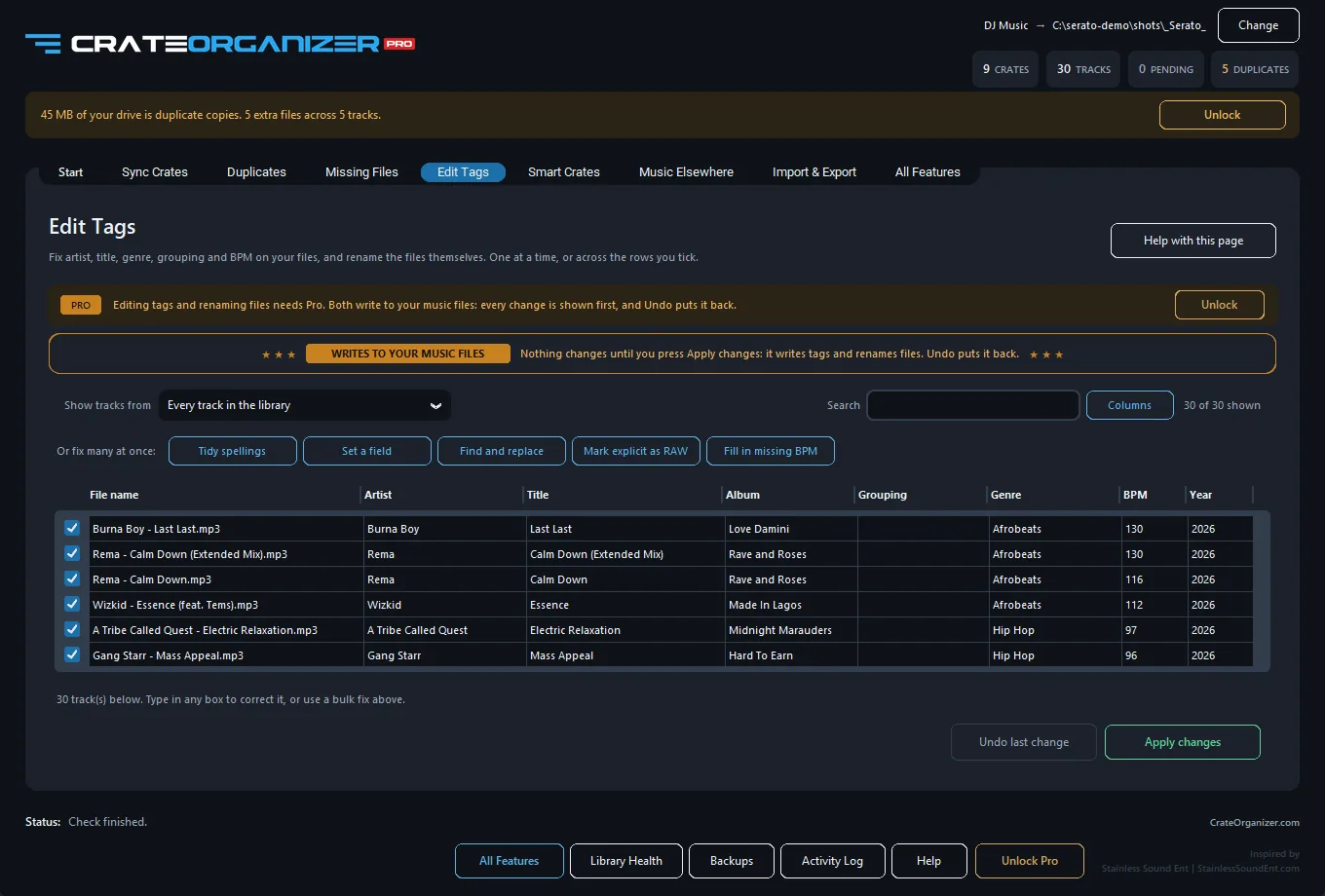
CrateOrganizer Pro puts artist, title, album, grouping, genre, BPM and year in one grid with the filename in the first column. You type, the cell turns orange, and nothing is written until you press Apply.
- Fill missing BPM by reading the files rather than guessing
- Collapse four spellings of one artist into the correct one
- Rename the file and update Serato’s database and every crate in the same pass
- Every change previewed, everything backed up first
The five bulk edits worth doing first
If you are going to bulk edit tags for Serato at all, these five give back the most time for the least risk, in roughly this order.
- Fill in missing BPM. Sorting and smart crates both depend on it, and blank BPM quietly breaks both.
- Collapse artist spellings. Four versions of one name means four places to look mid-set.
- Fix the year. A common complaint: “So many files have either no info under year or the wrong info.” If you sort by era, this is the field that matters.
- Standardise genre. Not to a scheme someone else invented, to whatever you actually call things.
- Mark clean and explicit versions so you are not guessing at a wedding.
Leave beat grids and cue points alone. Those are performance data, not metadata, and no bulk edit should go near them.
Serato documents how tags are read on import in Adding files to the Serato DJ Pro library.
One argument against all of this
Worth hearing, because it is a fair point made by a working DJ: mass tagging can flatten what makes your library yours. “A computer or script can never apply the nuance that you’ll personally find in songs… letting a system mass tag your collection can make searching through it like going through someone else’s music library rather than your own.”
That is an argument against automatic tagging, and it is correct. A table you type into is a different thing. The judgement stays yours; only the clicking is automated.
The verdict
Under fifty tracks, use Serato and do not install anything. Editing tags only, never filenames, MP3Tag is excellent and free. Renaming files, restructuring, or fixing thousands of records where the crates have to survive it, you need something that writes to the library as well as the file.
Frequently Asked Questions
Can I bulk edit ID3 tags in Serato directly?
Serato has limited bulk-edit tools. For true batch tag editing, use MP3Tag (Windows/Mac) to modify artist, title, genre, BPM, and key in bulk before reimporting.
What is the difference between editing tags in Serato vs MP3Tag?
Serato edits are cosmetic in the app only. MP3Tag writes changes to the file itself, so the tags persist even if you delete and re-import the track elsewhere.
If I edit tags in MP3Tag, will my Serato cues stay linked?
Yes. Serato links cues via file hash and metadata, not tag content. Changing tags does not break the link. Your cues reload automatically when you re-open the track.
Is it safe to edit tags while Serato is running?
No. Close Serato first, edit tags in MP3Tag, then restart Serato. If Serato has the file locked, tag changes may not save or may conflict with Serato’s cached data.