
Duplicates
Serato duplicate tracks: remove them without losing your cue points
Serato duplicate tracks are simple to find and risky to delete. First you have to know which copy carries your cue points, because Serato stores them against one file only. Delete the wrong copy and you lose the work. Group duplicates by certainty, keep the one with the cues, and repoint every crate at it.
Duplicate tracks in Serato usually arise from importing the same file twice or from syncing conflicting library sources. Use CrateOrganizer to identify and remove duplicates while preserving cues and crate membership in one pass.
Contents
Why Serato has no duplicate tracks finder
It simply is not a feature. Ask on r/Serato and the top answer is honest about it: “I don’t think there’s a way to identify duplicates in Serato. I would order by name and scroll through, deleting as you go.”
That works for a few hundred tracks. At ten thousand it is a lost weekend, and DJs describe finding “seven copies” of records they never even played.
The four kinds of Serato duplicate tracks
Lumping them together is why people give up. They need different handling.
| Type | How to spot it | Safe to delete? |
|---|---|---|
| Identical file, two places | Byte-for-byte the same | Yes, keep one |
| Same track, different bitrate | Same artist and title, different size | Yes, keep the best quality |
| Same track, different filename | Tags match, names do not | Usually, check the cues first |
| Different edits | Radio, extended, intro, acapella | No. These are not duplicates |
That last row is important. A filename-matching tool will happily offer to delete your intro edits.
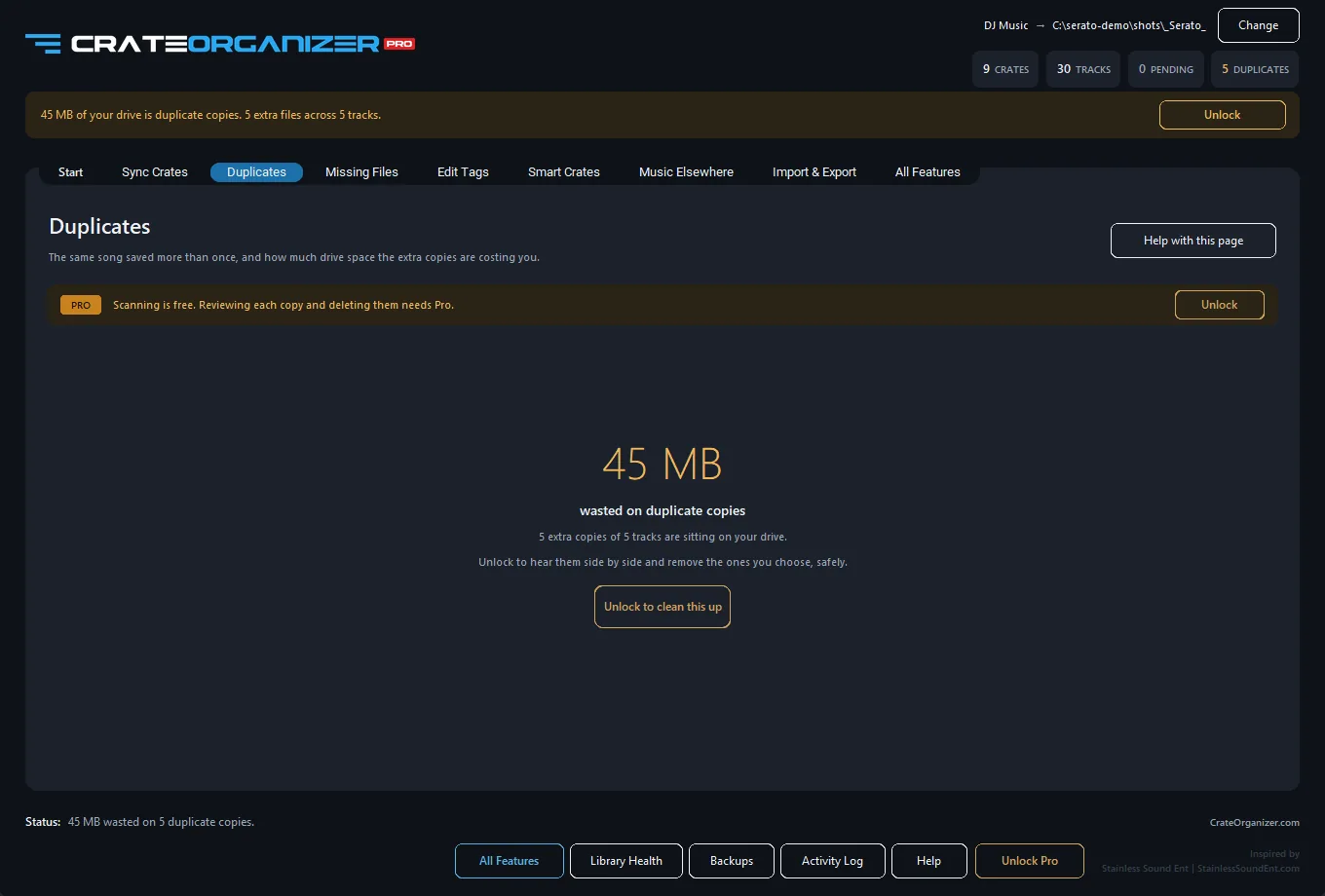
The question that matters: which copy has my cues?
This is the question that stops most DJs from ever starting, and it has been asked in the same words for a decade. In 2016: “my only concern is that the cue point and loop info is written against one of the files, which is the file i don’t want to delete.” In 2026, someone asked a library tool exactly the same thing.
How CrateOrganizer Pro handles it. The copy carrying your cues, loops and grids is the one kept by default, and every crate that pointed at a deleted copy is repointed at the keeper. You do not end up with a tidy library full of new red tracks.
The manual method and what it costs
- Open the All crate.
- Click the Song column to sort alphabetically.
- Scroll, looking for repeated titles sitting next to each other.
- For each pair, check length and bitrate to decide which to keep.
- Load the one you plan to delete and check whether it has your cue points.
- Remove from the library, and separately delete the file if you want the space back.
It works. It also misses every duplicate whose tags spell the artist differently, which in a real library is most of them.
Why dupeGuru is not enough for a DJ library
dupeGuru is the community’s usual answer and it is a good general tool. It has two limits that matter here.
- It knows nothing about crates. Delete a file and the crate pointing at it is now broken, so you trade duplicates for missing files.
- It knows nothing about cue points. It cannot tell you which copy holds your work, which is the only question you actually needed answered.
How many Serato duplicate tracks is normal?
More than you would guess. DJs who have been buying music for years routinely find that a fifth of the library is redundant, and the reports get worse the longer the collection has run.
| Library age | Typical duplicate share | Usual cause |
|---|---|---|
| Under 2 years | 2 to 5 per cent | The odd re-download |
| 5 years | 10 to 15 per cent | Pool downloads, re-buys, USB round trips |
| 10 years or more | 20 per cent and up | Drive merges and library rebuilds |
One DJ found seven copies of a record he had never played. Another described 150 GB of Serato duplicate tracks. That is not carelessness, it is what happens when you merge drives a few times over a decade.
Removing duplicates safely
Whatever tool you use, the order matters:
- Close Serato. Anything changed while it is open gets overwritten.
- Back up your crates, and keep more than one restore point.
- Group by certainty, not by filename. Identical files first, tag matches second, name matches last.
- Keep the copy with the cues, and repoint crates at it.
- Review before deleting. Nothing should be removed without you seeing the list.
- Reopen Serato and spot-check a few crates.
Questions
Does Serato have a duplicate finder?
No. There is no built-in way to find duplicates in Serato. The usual advice is to sort the All crate by name and scroll through it by hand.
Which duplicate has my cue points?
Serato stores cues, loops and grids against one specific file. If you delete that copy the work goes with it. A duplicate tool that reads the database can tell you which copy it is and keep that one.
Will removing duplicates break my crates?
It will if you delete the files with a general tool that does not know about crates. Crates pointing at a deleted copy turn red. Repointing them at the copy you kept avoids this.
Are different edits of the same song duplicates?
No. Radio edits, extended mixes, intro versions and acapellas are separate records. Filename matching often flags them wrongly, so check before deleting.
How do I find duplicates with different bitrates?
Filename comparison will miss them. Matching on artist, title and duration finds the same recording saved at different quality, and you keep the best copy.
Sources and further reading
- What is in the _Serato_ folder, Serato Support
- Backing up and moving your library to a new computer, Serato Support
- Import folder structure into the crates system, Serato forum
Written from Serato’s own documentation, the official Serato forum and the working DJs who post about these problems. Where a quote appears, it is copied exactly, typos included.
Frequently Asked Questions
How do duplicate tracks happen in Serato?
Duplicates occur when you import the same audio file twice (different crate paths), or when you move a file and Serato imports it again without removing the old link.
If I delete a duplicate track from my crate, will I lose cues from both versions?
No. Serato stores cues by file hash and metadata. Deleting one crate entry leaves the cue data intact. You can relocate either version later and restore the cues.
Can I safely remove duplicates without checking every cue first?
Yes, because cues are stored in the Serato database, not the crate file. Delete the duplicate entry and your cue data remains safe in the _Serato_ folder.
Does Serato warn me when I add a duplicate track?
No. Serato allows duplicates by design, so audit your crates manually or use CrateOrganizer to spot and merge duplicates visually.